
Where to Watch Spider-Man Movies on IPTV in 2026
If you want to watch Spider-Man movies on IPTV in 2026, the honest answer is this: the films live on a handful of licensed streaming services, and a good IPTV setup is simply the screen and the app layer that gets you there. The core trilogy and the newer films are spread across Disney Plus and Netflix in most regions, with a few titles you rent or buy. Your IPTV box, app, or smart TV interface is the doorway. The actual movie rights sit with the broadcasters. So the real skill is knowing which service holds which film, then pointing your device at it. That is what this guide does, plainly and without the runaround.
What People Actually Mean by Watch Spider-Man Movies on IPTV
Here is the part most articles skip. When someone types “watch Spider-Man movies on IPTV,” they usually picture one tidy app with every film waiting inside. That is not how film rights work. Sony owns the films and licenses them out, so the movies scatter across different platforms depending on the year and your country. IPTV, in the clean sense, is just internet-delivered television.
It can mean a smart TV interface, a streaming stick, or an app that organises your subscriptions in one place. None of that grants you the films by itself. You still need the underlying service that legally holds the title. Think of IPTV as the remote and the menu, not the movie vault. Once that clicks, everything else in this guide makes sense, and you stop chasing a single magic app that was never going to exist.
Where Each Spider-Man Film Legally Streams Right Now
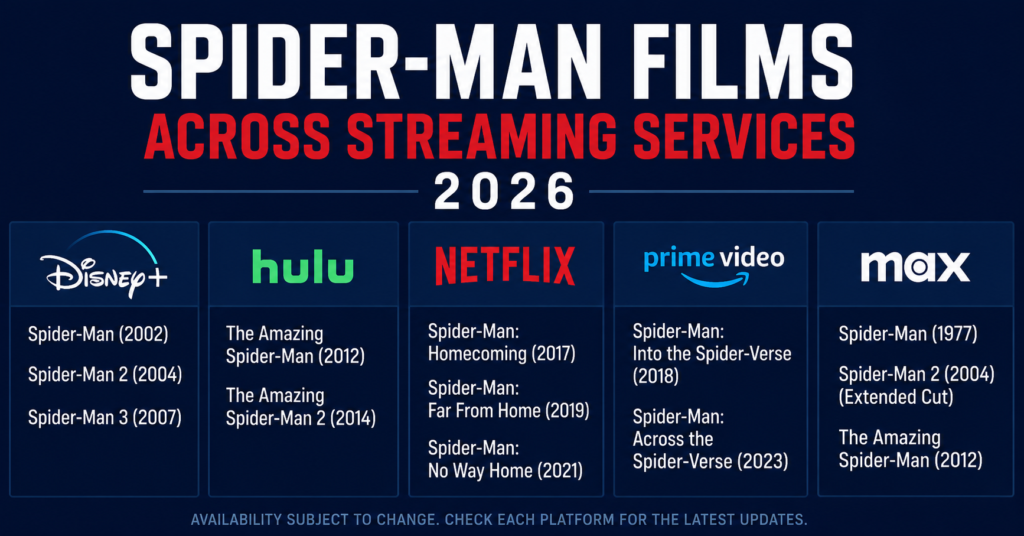
Let me give you the map. In 2026, most Spider-Man films sit on Disney Plus, which carries the live-action eras of all three lead actors plus several animated titles. Some entries also rotate onto Netflix depending on Sony’s current windowing deals, and a few you rent or buy through digital stores when they are not on a subscription you already hold.
The newest theatrical film, released in summer 2026, is in cinemas only and has not reached streaming yet, so no legitimate app has it. Availability shifts by region and by the calendar, which is exactly why a “one app forever” promise should make you suspicious. If you want a reliable home setup that pulls these services together cleanly, a properly configured IPTV reseller panel can centralize your legal subscriptions on one interface without pretending to be the rights holder.
The Streaming Map at a Glance
A quick table makes the spread easier to hold in your head. Availability changes, so always confirm inside the app before you settle in.
| Film Era | Usual Home in 2026 | How You Access It |
|---|---|---|
| Original trilogy | Disney Plus | Subscription |
| The Amazing era | Disney Plus, sometimes Netflix | Subscription |
| Modern shared-universe films | Netflix then Disney Plus | Subscription, windows rotate |
| Animated multiverse films | Netflix and rental stores | Subscription or rent |
| Newest 2026 theatrical film | Cinemas only | Tickets, no streaming yet |
Pro Tip: Before you pay for anything, open the search bar inside a service you already have. Half the time the film you want is sitting on a subscription you forgot you were paying for.
Why You Cannot Watch Spider-Man Movies on IPTV Through One Single App
People get frustrated here, so let me explain the why instead of just stating it. Sony does not run its own streaming service, so it sells streaming rights to whoever offers the best deal. That means one film can be on Netflix this year and shift to Disney Plus next year, while another stays on a rental store the whole time. No legitimate IPTV product can override those contracts and bundle every film into one library, because the rights simply are not theirs to bundle. When a panel or seller claims they have “all Spider-Man films, always,” that is the warning sign.
A trustworthy operator, like the kind running a transparent buy IPTV credits UK model, sells you infrastructure and access to legitimate services, not a magic vault of copyrighted films they were never licensed to hold.
The Honest Bit About IPTV, Legality, and Grey Areas
I am not going to gloss over this, because you deserve the straight version. There is a clear, legal side of IPTV: smart TV platforms, legitimate apps, and reseller setups that organise subscriptions you have actually paid for. Then there is the grey-to-illegal side: panels selling cut-price access to films and channels they have no licence to distribute. The films in this guide are protected works.
Watching them through a service that genuinely licensed them is fine. Watching them through a panel that “found” them cheaply is not, and it carries real risk to you and to the seller. The technology itself is neutral. The legality lives entirely in whether the content was licensed. Keep that line in mind and you will stay on the right side of it without overthinking.
How a Reseller Panel Fits Into Watching Spider-Man Movies on IPTV
So where do reseller panels honestly belong in this picture? Their legitimate job is operational. A reseller panel lets a business manage customer accounts, allocate credits, and provide a clean interface for users who have signed up for legal services. It is the back office, not the film studio. If you run or buy from one, the value is organisation, support, and a tidy single point of management, not unlicensed films.
For example, an operator such as britishseller.co.uk can be one illustrative provider among many that focus on the infrastructure layer rather than promising copyrighted content they cannot lawfully supply. When you frame the panel as plumbing rather than a movie library, the role of IPTV in watching these films finally sits in the right place, legal and sensible.
Setting Up Your Device the Smart Way
Here is the practical setup, kept simple. Pick the device you already like, whether that is a streaming stick, a smart TV, or a console. Install the official apps for the services that actually hold the films, usually Disney Plus and Netflix in 2026. Sign in with your own paid accounts. If you want everything tidied into one managed interface, that is where a legitimate panel or a guide on choosing the best UK IPTV service earns its keep, by reducing app-hopping rather than supplying content. Keep your software updated, use a strong password, and check each app’s search before assuming a film is missing.
That is genuinely the whole job. No sideloaded mystery apps, no codes from a stranger, no panel promising the impossible.
Pro Tip: Stick to apps from your device’s official store. If an installation asks you to switch off security settings or sideload from a random link, close it. That is the fast lane to malware, not movies.
Region Matters More Than You Think
One more thing that trips people up. Where you live changes what you can watch Spider-Man movies on IPTV through, because Sony’s deals differ by country. A film on Netflix in one region might be on a rental store in another, or on Disney Plus somewhere else entirely. This is normal licensing, not a glitch. The fix is not a shady workaround. The fix is checking the official app in your own region and accepting that the lineup is built around legal agreements.
If a title genuinely is not available where you are yet, the honest options are to wait for the window, rent it if offered, or catch it when it rotates onto a service you have. Patience beats a panel that promises to dodge geography for you.
Quick Comparison: Legitimate Access vs the Risky Shortcut
This small table sums up the choice you are really making.
| Factor | Legitimate Apps and Panels | Risky Unlicensed Panels |
|---|---|---|
| Film source | Properly licensed | Unlicensed, copyright risk |
| Reliability | Stable, supported | Drops without warning |
| Your exposure | None | Legal and security risk |
Bringing It All Together
So, can you watch Spider-Man movies on IPTV in 2026? Yes, when you understand what IPTV honestly is: the screen, the apps, and sometimes a tidy management layer, sitting on top of the services that actually licensed the films. Disney Plus and Netflix carry most of the lineup, a few titles need renting, and the freshest theatrical release is still cinema-only.
The legitimate role of a UK IPTV reseller panel is organization and support, never a vault of copyrighted films. Keep that distinction and you get a clean, reliable, lawful setup. Chase the “one app has everything cheap” myth and you get instability and risk. The smart path is simple, legal, and honestly less hassle than the shortcut ever was. That is the whole story, no fog.
Subscriber Checklist
Use this if you just want to watch.
- Confirm which service holds the film you want before paying anything.
- Install only official apps from your device’s store.
- Search inside subscriptions you already own first.
- Check availability for your own region, not someone else’s.
- Keep your apps and device software updated.
- Walk away from any seller promising “all films, always, cheap.”
Reseller Checklist
Use this if you run a panel as a business.
- Sell access and infrastructure, never unlicensed copyrighted films.
- Be transparent with customers about what is and is not included.
- Offer real support and clean account management.
- Keep your credit and billing system tidy and auditable.
- Choose suppliers who operate on the legitimate side of the line.
- Document your terms so customers know the legal boundaries.
Sub-Reseller Checklist
Use this if you resell under a larger panel.
- Verify your upstream provider operates legitimately before signing on.
- Pass accurate information to your own customers, no inflated promises.
- Track your allocated credits and renewals carefully.
- Avoid marketing copyrighted films you have no licence to supply.
- Keep a direct support line to your parent panel.
- Review the legal grey areas honestly with anyone you onboard.